Implementing Just-In-Time Access and Zero Trust Policies in Microsoft Entra ID
Modern Identity and Access Management (IAM) requires moving away from permanent administrative access. Leaving high-privilege credentials active 24/7 introduces significant security risks, opening the door to credential theft, lateral movement, and unauthorized tenant changes.
To mitigate these risks, I built a hands-on identity lab in Microsoft Entra ID focusing on Privileged Identity Management (PIM), Conditional Access (CA), and Multi-Factor Authentication (MFA). The project enforced the Principle of Least Privilege (PoLP) through Just-In-Time (JIT) role activation while applying strict access controls to administrative sessions.
Here is a full breakdown of how I built the architecture, the troubleshooting obstacles I hit along the way, and the core identity engineering lessons I learned.
Architecture Overview
The lab environment was structured to isolate standard administrative traffic from high-risk operations:
- Primary Global Administrator:
michaelgonzalez@michaelgxd.onmicrosoft.com(Used to author security policies and manage tenant-wide settings). - Test Administrative Account:
j.doe-admin@michaelgxd.onmicrosoft.com(Used to validate end-user MFA registration, PIM activation workflows, and Conditional Access enforcement). - Conditional Access Policy 1 (
CA001-Enforce-MFA-For-Admins): Enforces Multi-Factor Authentication via Microsoft Authenticator for any account accessing administrative features or assigned to directory roles. - Conditional Access Policy 2 (
CA002-Block-Legacy-Authentication): Blocks non-modern authentication protocols (such as legacy IMAP/POP3) while allowing modern browser traffic. - Privileged Identity Management (PIM): Eliminates standing privileges by making administrative roles eligible rather than permanent, requiring time-bound activation and justification.
Phase 1: Configuring Conditional Access and MFA Registration
The first objective was establishing a baseline MFA requirement for administrative accounts using policy CA001.
However, enforcing MFA on admin accounts before the target user (J.Doe-Admin) completes initial security info registration creates a bootstrap problem. When logging in to configure MFA at mysignins.microsoft.com, the user is intercepted by the very policy requiring MFA to sign in.
[User Sign-In Attempt] ──> [Conditional Access Policy Evaluates] ──> [MFA Required] ──> [Access Blocked (Error 53003)]
To unblock the initial onboarding flow, I temporarily scoped registration access or guided the account directly through [https://aka.ms/mfasetup](https://aka.ms/mfasetup) to pair the Microsoft Authenticator app. Once MFA methods were bound to J.Doe-Admin, the policy could evaluate token requests against a valid authentication method.
Phase 2: Real-World Hiccups & Token Cache Troubleshooting
During the implementation of Conditional Access policies and PIM role assignments, I encountered several unexpected authentication errors that closely mirror real-world production rollout issues.
1. The Token Misconfiguration Cascade (Error 53003)
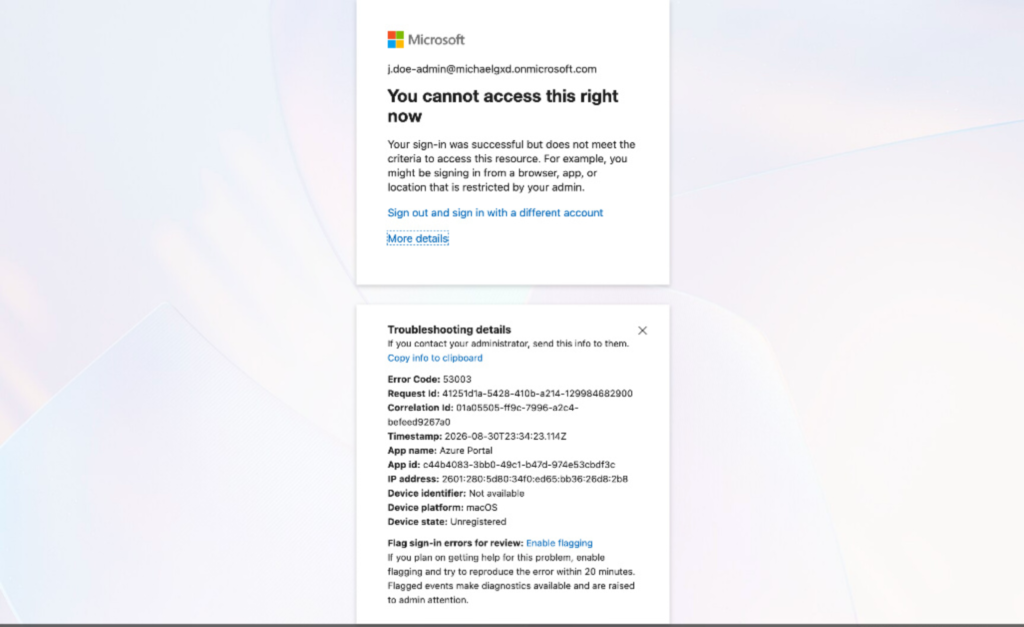
After toggling policies off to finish account setup, J.Doe-Admin was still blocked by Error 53003 (Access has been blocked by Conditional Access policies).
- The Cause: Entra ID caches security token states aggressively inside local browser storage and session cookies. Even if a policy is turned off or updated in the backend, the browser’s active MSAL (Microsoft Authentication Library) session continues presenting the stale, unauthenticated token state.
- The Solution: Closing all InPrivate windows, clearing site data for
microsoft.comandoffice.comin Developer Tools, and launching a completely fresh private browser session cleared the local MSAL state and pulled updated policy claims.
2. Dissecting the Sign-In Logs (Legacy Auth Misconfiguration)
When both CA001 and CA002 were active, portal access was unexpectedly dropped before prompting for MFA.
Instead of guessing which setting failed, I navigated to Identity > Monitoring & health > Sign-in logs under the Global Admin context. Inspecting the interactive sign-in events for J.Doe-Admin revealed that CA002-Block-Legacy-Authentication evaluated to Failure with a Block grant control.
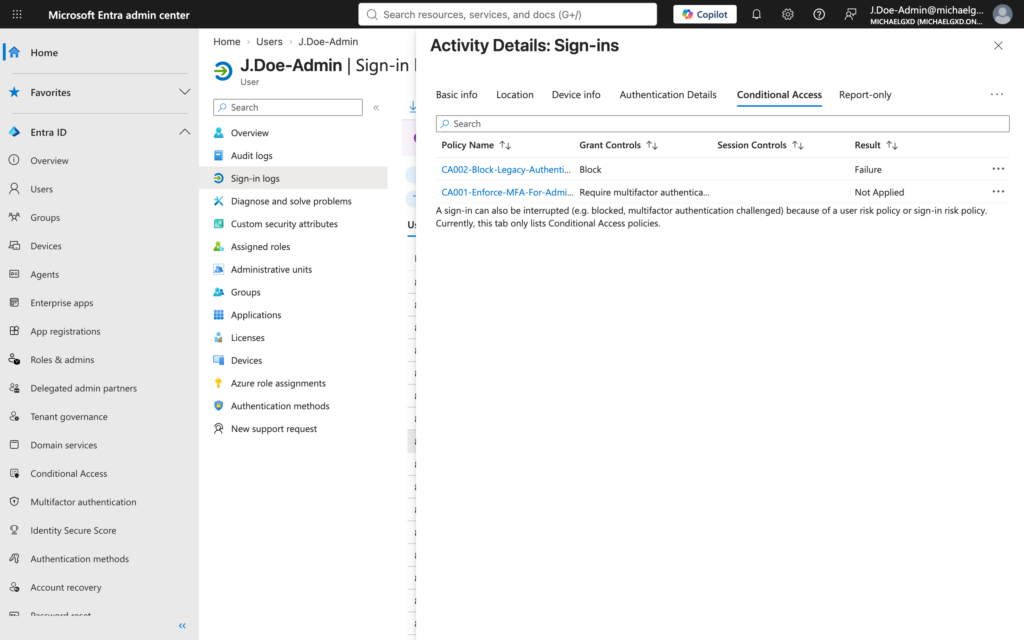
- The Cause: The
CA002condition for Client apps was set too broadly, inadvertently catching standard Browser sessions alongside legacy protocols. - The Solution: Re-configuring
CA002to target only Exchange ActiveSync clients and Other clients, while unchecking Browser, resolved the conflict. This allowed web browsers to pass through toCA001for the required MFA challenge.
3. Step-Up Authentication Context (invalid_grant: AADSTS53003)
When J.Doe-Admin logged into the portal and clicked on My roles inside Privileged Identity Management, an interactive pop-up appeared stating: invalid_grant: AADSTS53003: Access has been blocked by Conditional Access policies.
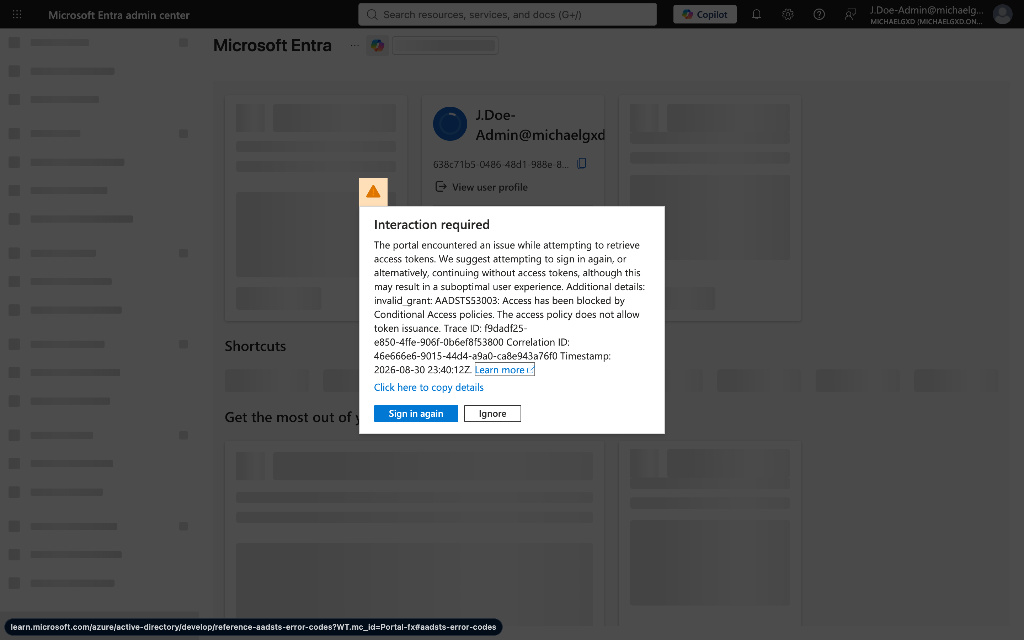
- The Takeaway: This was not a broken setting—it was Conditional Access Step-Up Authentication working as designed. Entra ID allowed
J.Doe-Adminto view standard portal areas, but accessing PIM triggered a higher-tier risk check that demanded fresh MFA verification before issuing a specialized PIM management token. Clicking Sign in again and approving the Authenticator notification satisfied the requirement.
Phase 3: Executing Just-In-Time (JIT) Privileged Access
With Conditional Access properly tuned, I finalized the PIM workflow for J.Doe-Admin:
- Role Eligibility: Assigned User Administrator as an Eligible assignment rather than active/permanent.
- JIT Activation: Signed in as
J.Doe-Admin, navigated to Privileged Identity Management > My roles, and submitted an activation request with business justification. - Step-Up Verification: Completed the Microsoft Authenticator push notification to satisfy
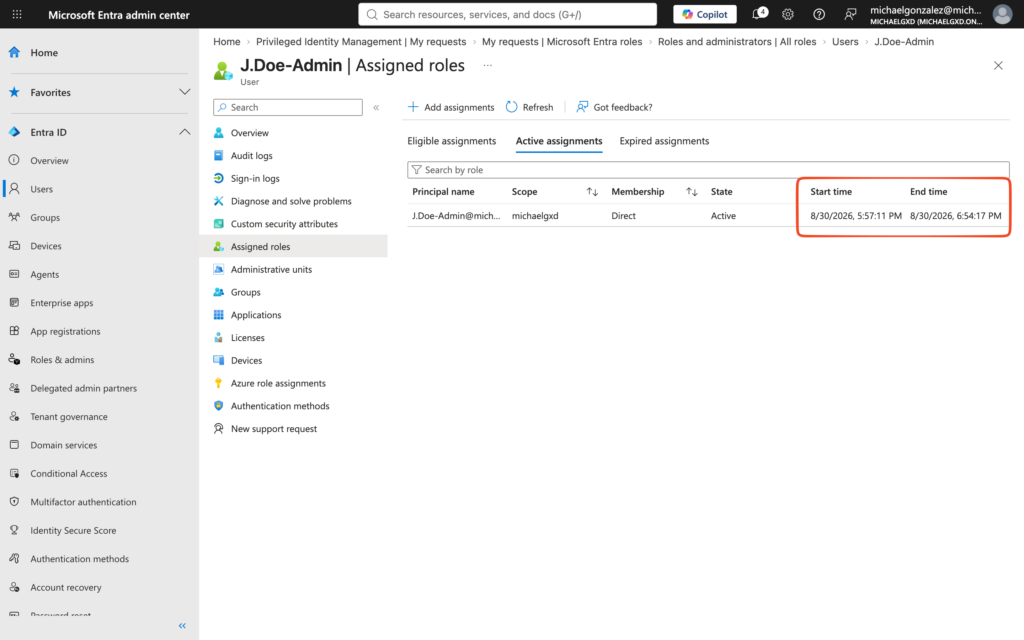
CA001. - Approval & Countdown: Approved the activation request from the
michaelgonzalezGlobal Admin session.J.Doe-Adminreceived active administrative privileges bound to a short-lived expiration timer.
Key Security Takeaways & Portfolio Summary
- Never Leave Policies Disabled: Turning off security policies during a block event is only useful for diagnostic isolation. Production environments must rely on targeted policy exclusions (e.g., dedicated break-glass accounts or explicit role scope) rather than turning off protection tenant-wide.
- Sign-In Logs Are Essential: Reading the Conditional Access tab inside Entra ID’s interactive sign-in logs provides definitive server-side proof of why a token was denied, removing the guesswork from identity engineering.
- Zero Standing Privileges: Implementing PIM ensures that administrative credentials remain unprivileged standard accounts until an explicit, time-bounded, and audited activation request is approved.
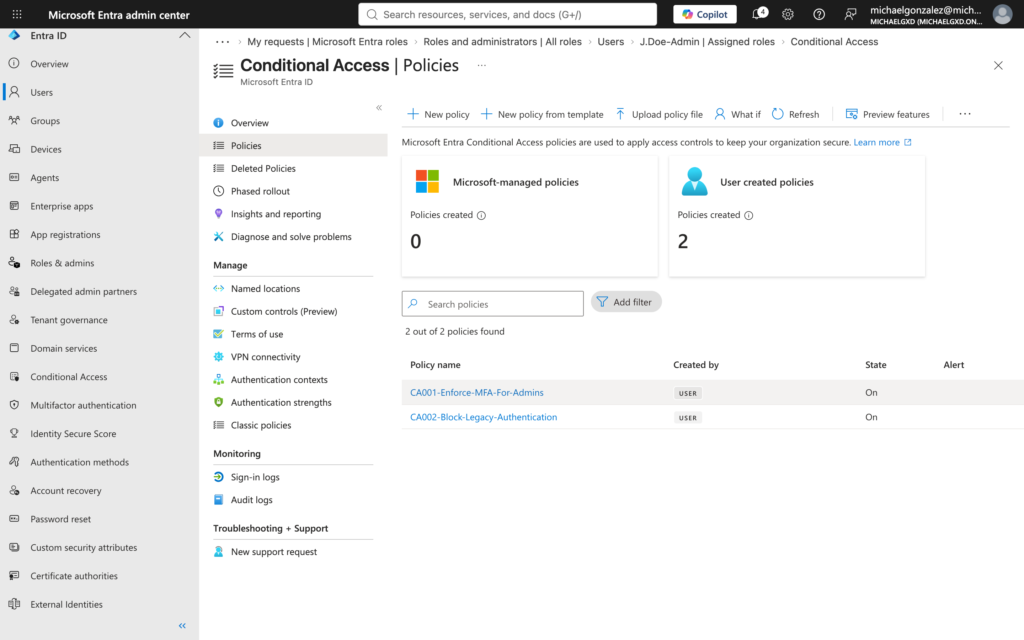
This lab successfully demonstrated how combining Conditional Access, MFA, and Privileged Identity Management creates an enterprise-grade Zero Trust perimeter, ensuring administrative credentials are heavily protected, strictly verified, and granted only when necessary.