Building a Zero-Trust Enterprise Identity System in Microsoft Entra ID
August 30, 2026
Building a Zero-Trust Enterprise Identity System in Microsoft Entra ID
Modern cybersecurity relies on identity as the primary security perimeter. Traditional network firewalls no longer suffice when employees access software-as-a-service (SaaS) environments and cloud infrastructure from disparate locations and devices.
To demonstrate production-grade expertise in Identity and Access Management (IAM), I architected and deployed a Zero-Trust Enterprise Workforce Identity System using Microsoft Entra ID (formerly Azure Active Directory). This project implements enterprise Single Sign-On (SSO), OpenID Connect authentication, automated user lifecycle governance, and risk-based Conditional Access controls.
1. Project Overview & Architecture
The goal was to build a centralized Identity Provider (IdP) architecture enforcing three core principles of Zero Trust: Verify Explicitly, Use Least-Privilege Access, and Assume Breach.
[ Unauthenticated User ]
           │
           ▼
[ Microsoft Entra ID (IdP) ]
           │
  ┌────────┴────────────────────────┐
  ▼                                 ▼
[ Policy Engine ]         [ Federated Apps ]
  │                                 │
  ├─► Enforce MFA (Admins)           ├─► SAML 2.0 (SaaS App)
  ├─► Block Legacy Auth             └─► OIDC / OAuth 2.0 (Custom App)
  └─► Validate Group Rights
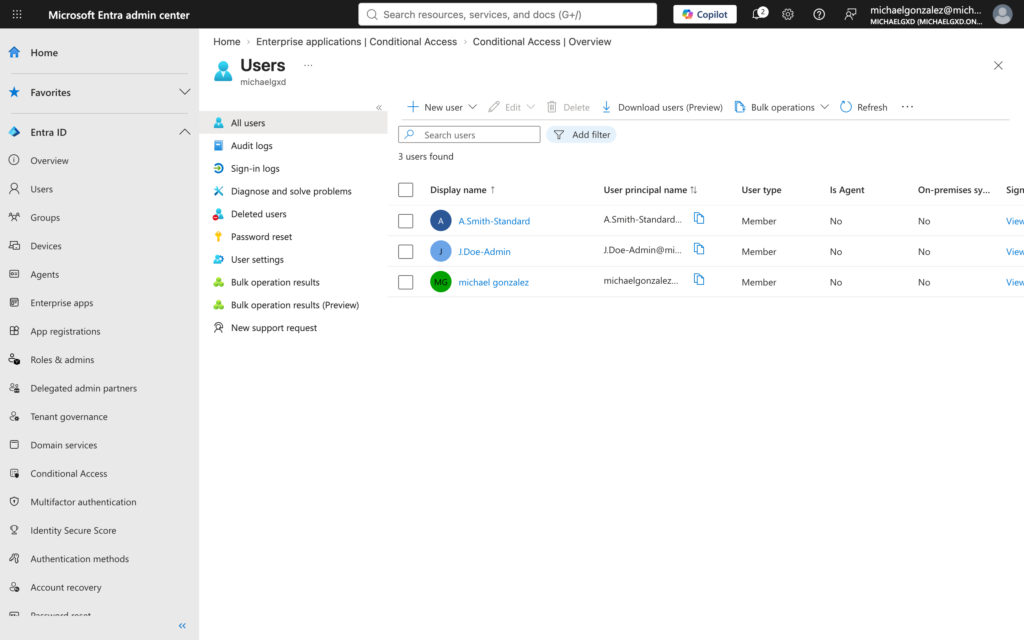
To enforce Role-Based Access Control (RBAC), I provisioned three discrete test identities alongside dedicated access groups:
J.Doe-Admin: Privileged identity configured for administrative operations.
A.Smith-Standard: Standard employee identity without administrative directory roles.
SG-App-Access: Security group used for group-based application entitlement.
Figure 1: User provisioning in Entra ID isolating privileged administrative identities from standard workforce accounts.
Step 2: Enterprise SAML 2.0 Single Sign-On Configuration
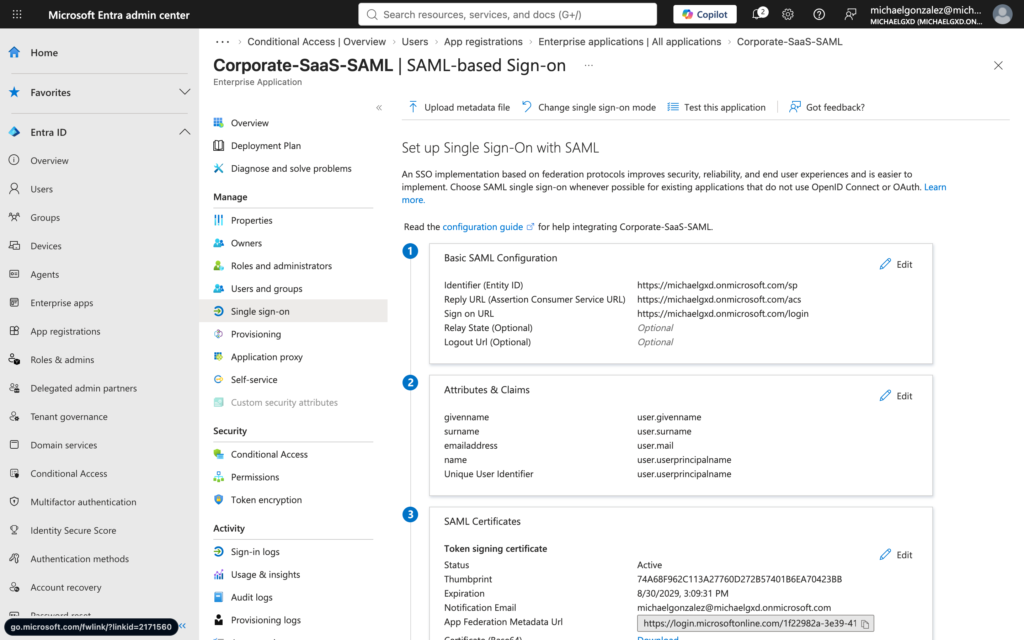
I federated Entra ID with a custom non-gallery enterprise application (Corporate-SaaS-SAML) using SAML 2.0 protocols to secure authentication assertions:
Configured Entity ID (Identifier) and Assertion Consumer Service (ACS) Reply URL endpoints.
Enforced Group-Based Access Assignment, granting authentication access strictly through membership in SG-App-Access.
Exported the Base64 SAML Signing Certificate for cryptographic assertion verification by the Service Provider.
Figure 2: Enterprise SAML 2.0 federation endpoints and single sign-on parameters.
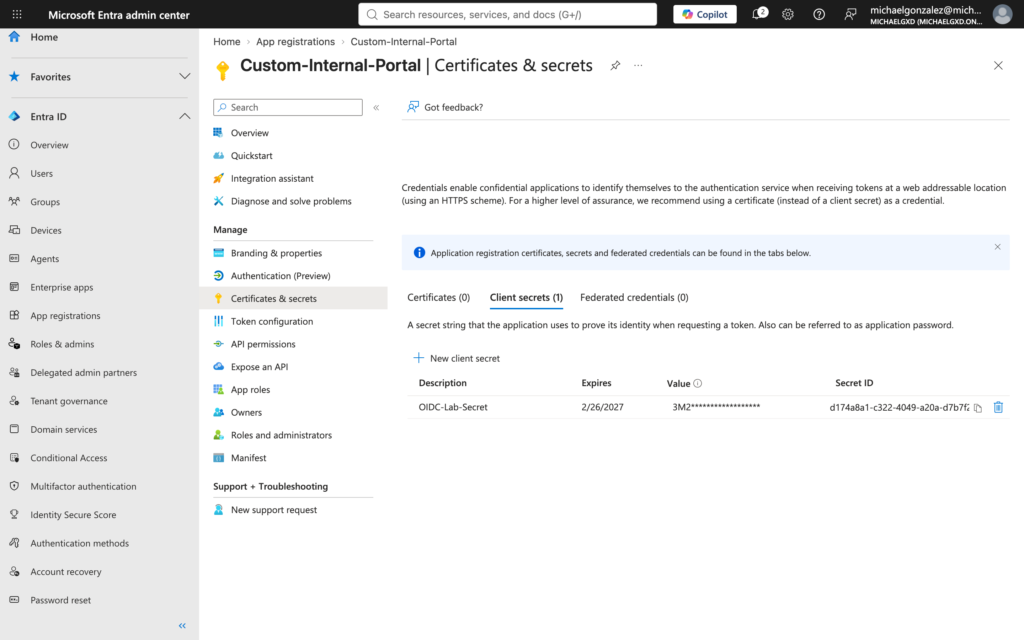
To support modern internal web application authentication, I registered a custom single-tenant application (Custom-Internal-Portal):
Generated a secure Client Secret for confidential client authentication.
Defined local OAuth callback redirect URIs (http://localhost:3000/api/auth/callback).
Configured delegated Microsoft Graph API permissions (User.Read, openid, profile) and granted tenant-wide Admin Consent.
Figure 3: OIDC application registration details and API access permissions.
Step 4: Outbound SCIM User Provisioning Contracts
To manage Joiner-Mover-Leaver (JML) identity lifecycles, I designed outbound System for Cross-domain Identity Management (SCIM 2.0) mapping rules. Standard Entra user attributes (userPrincipalName, mail, givenName, surname) were mapped to target schema parameters (userName, emails[type eq "work"].value, name.givenName, name.familyName) to ensure synchronized account creation and deprovisioning across SaaS services.
Step 5: Zero-Trust Conditional Access Enforcement
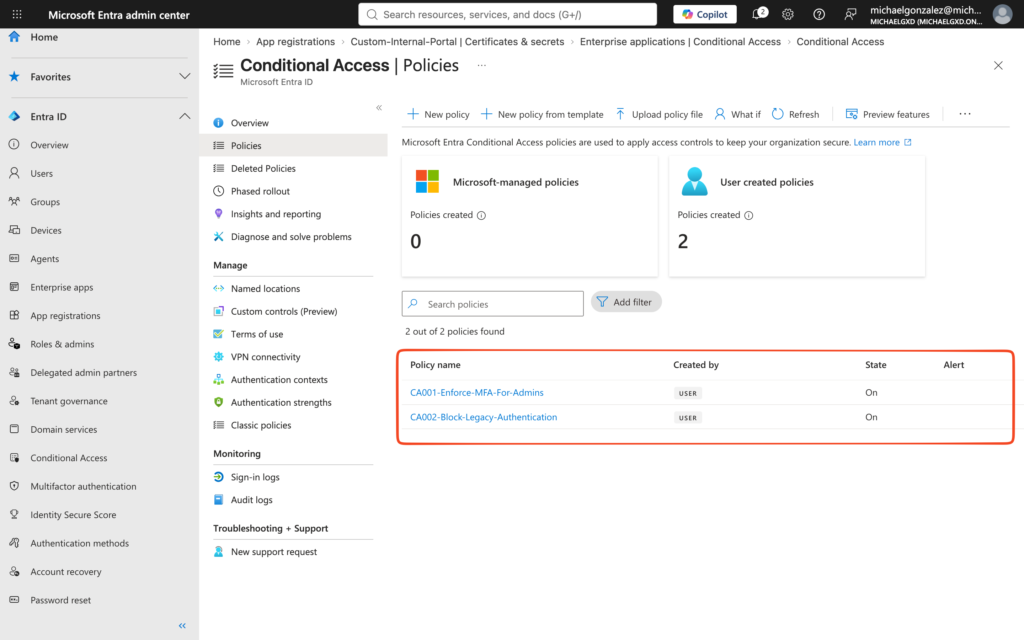
After disabling default legacy tenant settings, I deployed two explicit risk mitigation policies in the Conditional Access engine:
CA001-Enforce-MFA-For-Admins: Targeted administrative accounts (J.Doe-Admin) across all cloud apps, enforcing mandatory Multi-Factor Authentication.
CA002-Block-Legacy-Authentication: Targeted all tenant users across non-modern authentication mechanisms (Exchange ActiveSync, POP3, IMAP, Basic Auth).
Figure 4: Active Conditional Access policies enforcing MFA and blocking legacy protocols.
3. Key Takeaways & Lessons Learned
Tenant Licensing Boundaries: Identity controls like Group-Based App Assignment and Conditional Access require explicit Entra ID P1 or P2 licensing. Navigating cross-tenant administration highlighted the critical importance of tenant-level governance in enterprise environments.
Security Defaults vs. Custom Governance: Default security baselines must be disabled before custom Conditional Access policies can take effect. Organizations must deliberately choose between turnkey protection or customized policy rules.
Privilege Separation: End users should never hold standing directory admin roles. Identity security relies on group-based assignment models and tight access scopes.
4. GitHub Repository Structure
The complete architectural documentation, SCIM schemas, and exported policy JSON configurations are published in my public portfolio: